
Shipping with DQQ

Shipping fully integrated with your store, without the complexity

With DQQ, shipping connects to your store seamlessly — from issuing the waybill to completing the order — with competitive rates and flexible shipping options.

Join DQQ
100% integration, no store complexity
Unified tracking number (SAWB)
Cost shown before every shipment
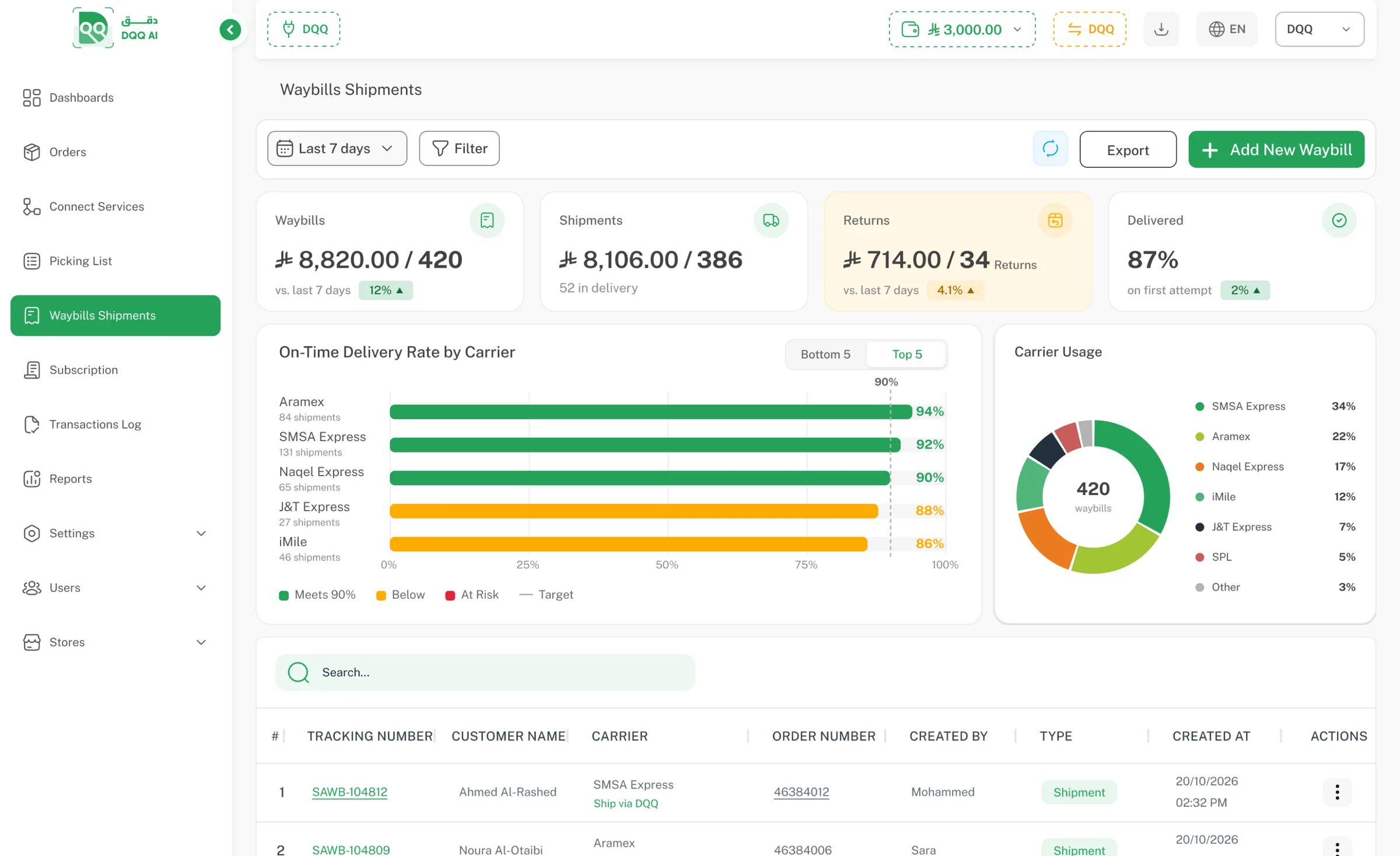
app.dqq.ai · Shipping Waybills
DQQ shipping waybills dashboard

A more integrated shipping experience with DQQ

Move from juggling separate contracts and channels to one unified shipping experience, run from a single place.

Direct contracts or the store channel

Current setup

You deal with every carrier separately, or ship through your store channel — so the waybill is created outside your fulfillment system and tracking is spread across several tools.

  1. 1 A separate contract and account with every carrier
  2. 2 Rates reviewed and negotiated carrier by carrier
  3. 3 A separate invoice and reconciliation per carrier
  4. 4 A different tracking number and system for each carrier
  5. 5 The waybill is created outside the fulfillment system
  6. 6 Shipment status followed across more than one system
5× Parallel contracts, invoices and systems
Management repeated with every carrier

Waybills through DQQ

One system

You deal with DQQ alone: the waybill is issued from the order page once fulfillment is complete, with pricing, wallet, tracking and support all from one side.

  1. 1 One contract covering the whole carrier network
  2. 2 Cost shown before you confirm every shipment
  3. 3 A single wallet every waybill is charged to
  4. 4 Unified tracking number (SAWB) for all shipments
  5. 5 The waybill is issued after fulfillment, from the order page
  6. 6 Tracking through to completed delivery in one list
  7. 7 Barcode scan and proof photo in the shipment log
1contract 5 separate contracts
Start shipping with DQQ

Smarter shipping starts here

A wider network, more options and a simpler shipping experience — all from one place.

0

Contracts with carriers

Start shipping without an agreement with any carrier

1

Unified tracking number (SAWB)

For every shipment, whichever carrier moves it

43%

Fewer steps to your first waybill

Four steps instead of seven, from sign-up to issuing

80%

Fewer contracting and billing steps

One contract and one invoice instead of five

What you get with every shipment

A network that moves your shipment, and a platform that unifies every detail.

One unified list for every waybill

One tracking number (SAWB) per waybill, so every shipment sits in a single list with search, filtering and export.

SAWB-100234 Delivered
SAWB-100233 In transit
SAWB-100232 Ready for pickup

Automatic carrier selection

Set conditions by city, warehouse or order status, and the carrier is picked and the waybill printed with no manual step.

If city = Riyadh
Choose carrier: SMSA Express

Enable partial shipping for an order

Turn on partial shipping to issue a waybill for the quantity you have, and ship whatever is left later within the same order.

Shipped 6 / 10 Remaining 4

Enable partial returns for an order

Turn on partial returns to issue a waybill for the returned quantities only, and return whatever is left later within the same order.

Waybill type Return Status Awaiting pickup

Issue the shipping waybill within your fulfillment stages

Issue it manually when you need to, or create it automatically when shipping starts.

Waybill issuing — available
01 New order The order arrived from your store Issuing available
02 Being fulfilled Products are picked from the shelves Issue the waybill now
03 Packed The order is packed and ready to ship Issuing available

Hand shipments to couriers from the app

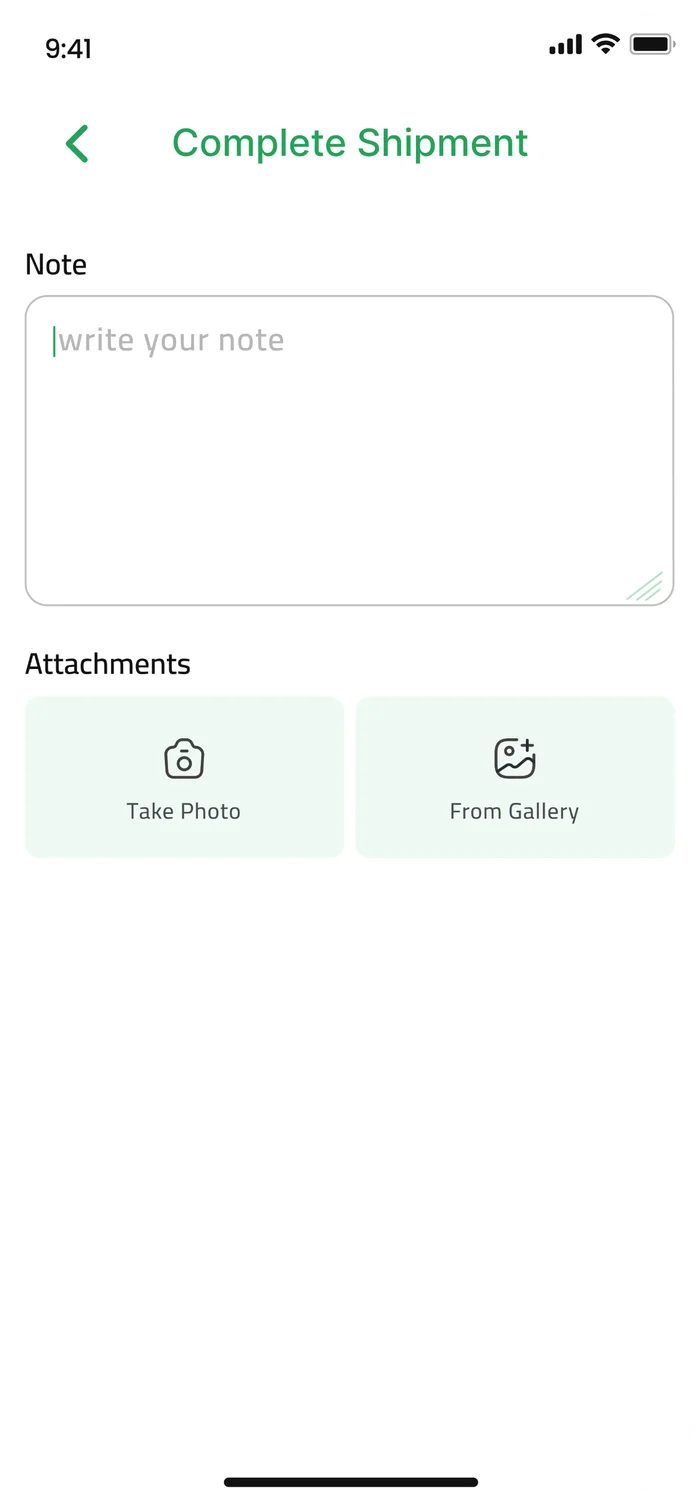
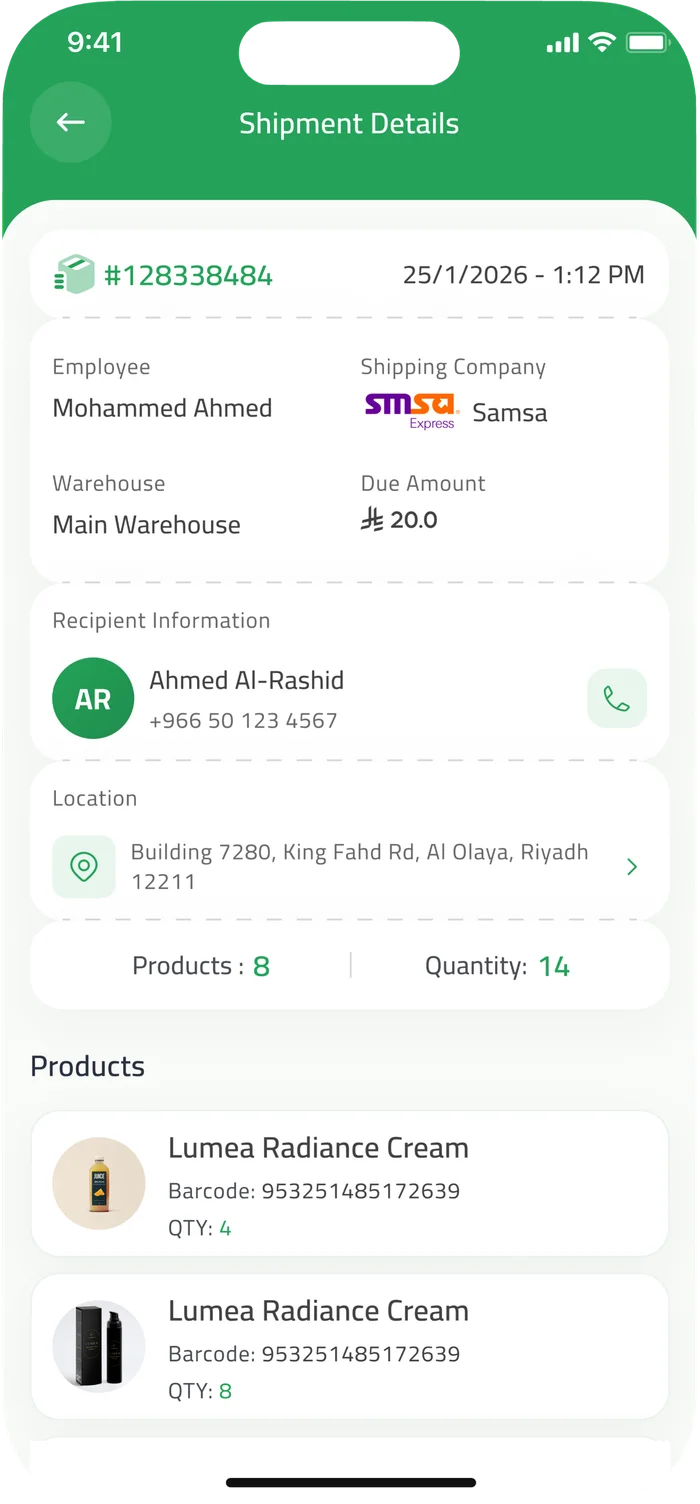
One screen in your warehouse team’s hands: the shipments ready to hand over, a scan of each one before it goes to the carrier’s courier, and the handover recorded in the shipment log.

  • 1 Ready shipments list Shipment number, date, product count and quantities, with search and filtering.
  • 2 Scan before handover Scan the barcode (Barcode) to confirm the shipment matches before handing it over.
  • 3 Record the courier handover Log the courier name, the carrier and the handover time with a proof photo.
  • 4 A complete handover log The action is saved to the shipment log and appears in operations reports.
Handover confirmation screen in the DQQ app
Shipment details screen in the DQQ app

How to start shipping with DQQ

Three steps from sign-up to your first waybill.

  1. 1

    Sign up with DQQ

    One contract opens the whole carrier network to you, without contracting with any of them.

  2. 2

    Top up the shipping wallet

    Add balance so every waybill is charged automatically, and switch on auto top-up when you need it.

  3. 3

    Create your first shipment

    From the order page, compare the network’s prices, pick a carrier and issue the waybill.

Start shipping with DQQ

No contracts with carriers, and no extra subscription fees.

Start shipping with DQQ

One contract opens the carrier network to you, with a waybill, a tracking number and a wallet from DQQ.

Join DQQ

Frequently asked questions

Do I need a contract with the carriers?

toggle

No. One contract with DQQ opens the whole carrier network to you, without contracting with any of them and with no extra subscription fees.

How is the cost of a shipment worked out?

toggle

DQQ shows every carrier price in the network as you create the shipment, so you pick before confirming, and the amount is taken from your shipping wallet when the waybill is issued.

Can I follow every shipment from one place?

toggle

Yes. Every waybill carries one unified tracking number (SAWB) whichever carrier moves it, and all your shipments sit in a single list with search, filtering and export.

When is the waybill issued?

toggle

Manually from the order page at any fulfillment stage, or automatically when shipping starts, based on the conditions you set.

All rights reserved for DQQ Platform © 2023